Showing posts with label Converter. Show all posts

3.2.12


ဒါေလးကေတာ ့ pdf file ကေန word file ေၿပာင္းတဲ ့ converter ေလးပါ။အထဲမွာ keygen ပါပါတယ္။သူ ့ရဲ ့Features and Interface ေတြကေတာ ့ေအာက္မွာေရးေပး
ထားပါတယ္။
PDF2Word (PDF to Word) software exports the text, images and other contents from any PDF document into MS Word document format (RTF or Word), so you can edit and reuse your PDF content.
PDF2Word (PDF to Word) preserves the original PDF text, layout and bitmap images in the generated Word document.


PDF2Word (PDF to Word) software is a standalone program and does not require Microsoft Word, Adobe Acrobat, or even Acrobat Reader.

PDF to Word/RTF Features and Interface :
* Convert PDF files into Microsoft Word documents;
* Batch PDF to Word conversion - convert multiple documents at once;
* Standalone software, MS Word, Adobe Acrobat and Reader NOT required!
* Support Command Line Operation (for manual use or inclusion in scripts);
* Support Win98/ME/NT/2000/XP/2003/Vista platforms;
* Automatically resize PDF page to fit your required Word page size;
* Accurately preserve text, pictures, and layout of the original PDF;
* PDF to Word is easy to use;
* Support multiple documents conversion (Batch Processing);
* Support drag and drop PDF files for conversion;
* Support PDF1.8 file format (formerly supported only by Adobe Acrobat 9.0);
* Converted files can be automatically loaded immediately after conversion is complete;
* Support page range conversion (all, from-to, individual pages);
* Support English, French, German, Italian, Chinese Simplified, Chinese Traditional, Czech, Danish, Dutch, Japanese, Korean, Norwegian, Polish, Portuguese, Russian, Spanish, Swedish, etc. languages;
* Support deletion of graphics and pictures from the generated Word document;
* Support encrypted PDF file conversion;
* Five reconstruction modes for PDF to Word conversion;
* Convert PDF file to flowing MS Word document without text boxes.


Download link :


Download link :


Posted on Friday, February 03, 2012 by ခြန္စစ္

1 comment

26.1.12

PhotoStampRemoverကPhoto ေတြမွာပါတဲ ့logo ေတြနဲ ့watermarkေတြ
ကိုဖ်က္တဲ ့ေနရာမွာအေတာ္ေလးအသံုး၀င္ပါတယ္။အထူးသၿဖင္ ့သူမ်ားဆီက
ယူလာတဲ ့ပံုကုိကိုကၿပန္သံုးခ်င္တယ္ဒါေပမယ္ ့ဟိုကwatermarkကပ္ထား
တယ္ဆိုရင္ဖ်က္ၿပီးေတာ ့သံုးဖို ့အတြက္အဆင္ေၿပပါတယ္။Installလုပ္ၿပီးတာ
နဲ ့အထဲမွာပါတဲ ့crack fileကိုcopyလုပ္ၿပီးC:\Program Files\Photo Stamp Removerလမ္းေၾကာင္းအတိုင္းreplaceလုပ္ေပးလိုက္တာနဲ ့full versionသံုး
လို ့ရပါၿပီ..အသံုးလိုမယ္ ့သူမ်ားေအာက္မွာေဒါင္းယူလိုက္ပါ။


Download link :

Download link :

Posted on Thursday, January 26, 2012 by ခြန္စစ္

1 comment

14.6.11

အရင္က ကြ်န္ေတာ္ Word to PDF ေျပာင္းပုံေလးေတြ တင္ခဲ့ဖူးပါတယ္ ... အဲ့ဒါေတြ က Software အကူအညီေလးေတြ နဲ႕ ေျပာင္းတာပါခင္ဗ်ာ .. တခါတေလ က်ရင္ အဆင္မေျပတဲ့အခ်ိန္က်ရင္ ျမန္မာေဖာင့္ ေတြ က အတုံးအတုံး ေတြ နဲ႕ ေပၚသြားတတ္ပါတယ္ .. အခု ဟာက ေတာ့ ကြ်န္ေတာ္တုိ႕အေနနဲ႕ Microsoft Word ထဲကုိ Plugin ေလး ထည့္ျပီးေတာ့ Word မွာေရး ျပီးရင္ Pdf အျဖစ္ Save လုိ႕ရပါတယ္.. Microsoft Word 2007 မွာ ဆုိရင္ ပုံမွန္အတုိင္းဆုိရင္ Pdf အျဖစ္ တခါတည္း Save လုိ႕မရပါဘူး .. ကြ်န္ေတာ္ အခု ေျပာတဲ့ Plugin ေလး ကုိ ထည့္သြင္းမွ သာ Pdf အျဖစ္ Save လုိ႕ရပါ့မယ္ ...
ကြ်န္ေတာ္တုိ႕ အေနနဲ႕ 2010 ထက္ 2007 ကုိ အသုံးမ်ားမယ္ထင္ပါတယ္ ..
ကဲ စၾကည့္လုိက္ေအာင္ ..

http://www.microsoft.com/download/en/details.aspx?displaylang=en&id=9943
အဲဒီ့ က Plugin ကေလးကုိ ေဒါင္းလုဒ္ခ်လုိက္ပါ .. ျပီးရင္ေတာ့ Run လုိက္ပါခင္ဗ်ာ .. Run လုိက္ျပီးျပီဆုိရင္ ကုိယ္ၾကဳိက္တဲ့ Microsoft word 2007 မွာ Save as ကေနျပီးေတာ့ Save မယ္ဆုိရင္ Pdf ဆုိတာေလး ေပၚလာပါ့မယ္ .. အဲ့ဒါ ဆုိရင္ Save လုိ႕ရပါျပီ ..

အခု ဒီေအာက္က ဟာကေတာ့ 2010 အတြက္ပါ .. 2010 အတြက္ဆုိရင္ေတာ့ ကြ်န္ေတာ္တုိ႕ အေနနဲ႕ Pdf လုပ္ဖုိ႕ Plugin ေတြဘာေတြ မလုိပါဘူး ..

File => Share အဲ့ဒီ့မွာမွ Create as Pdf/xps ဆုိျပီးေတာ့ ရွိပါတယ္ .. အဲဒါကေလးကုိ ႏွိပ္လုိက္ရင္ ရပါတယ္ ..


ျပီးရင္ေတာ့ ကုိယ္ၾကဳိက္တဲ့ေနရာေလးမွာ Publish လုပ္လုိက္ရင္ရပါတယ္ခင္ဗ် ...

ေနာက္တစ္နည္းကေတာ့ Software အကူအညီနဲ႕ပါ .. အဲဒီ့ Software ကိုသြင္းလုိက္ရင္ေတာ့ 2003/2007/2010 အကုန္လုံးကုိ အဆင္ေျပမယ္ထင္ပါတယ္ .. သူ႕ကုိ သြင္းလုိက္တာနဲ႕ ကြ်န္ေတာ္ တုိ ႕ Word ေပၚမွာ Pdf Plugin ကုိ တခါတည္း သြင္းျပီးသား ျဖစ္သြားပါလိမ့္မယ္ခင္ဗ် ..
အဲဒီ့ Software ကုိ ဒီေအာက္ကေနရာေလးမွာ သြားျပီးေတာ့ ေဒါင္းလုိက္ပါ ..
အဲဒီ့ Software ကေတာ့ Primo ပါ .. အဲဒီ့ေနရာကေလးမွာေဒါင္းျပီးေတာ့ ထည့္လုိက္ရင္ အဆင္ေျပသြားပါလိမ့္မယ္ခင္ဗ် ...

http://www.primopdf.com/index.aspx


ဒိေအာက္ကလင့္ကေတာ့ 2007 နဲ႕ 2003 အတြက္ Plugin ကေလးေတြပါ ..

http://www.mediafire.com/?hwqo5hghtyi2aba

ဒီေန႕ ကြ်န္ေတာ္စာေရး ထားတာ အဆင္မေျပဘူးထင္တယ္ဗ် .. ဖတ္ရတာ အဆင္မေျပရင္ ခြင့္လႊတ္ပါလုိ႕ ေတာင္းပန္ပါတယ္ခင္ဗ်ာ ... ေက်းဇဴးတင္ပါတယ္ ..

အစစအရာရာ အဆင္ေျပေပ်ာ္ရႊင္ပါေစလုိ႕ ဆုေတာင္းလ်က္ ....
ေမာင္လုလင္

Posted on Tuesday, June 14, 2011 by Unknown

No comments

17.4.10


Click ! Image to zoom!


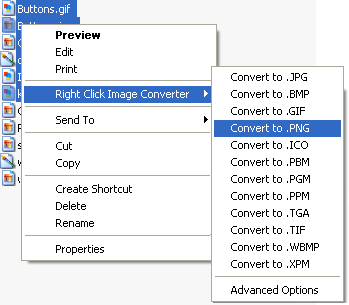
မဂၤလာပါ .. သၾကၤန္တြင္းရယ္ .. ျပီးေတာ့ ပ်င္းတာရယ္ .. ျပီးေတာ့ ပ်င္းပါတယ္ဆုိမွ အဖ်ားကေလး ပါ ၀င္စြက္လုိက္ေတာ့ ဘယ္မွ ေရးလည္းမေရးျဖစ္ .. ျပီးေတာ့ software ကေလးေတြလည္း ျပန္မမွ်ႏုိင္ .. ေမးထားတာကေလးေတြ ကုိလည္း ျပန္ မေျဖ ေပးႏုိင္ခဲ့တဲ့ အတြက္ အားလုံး ကုိေတာင္းပန္ပါတယ္ ခင္ဗ်ာ ....အခု တင္ေပးလုိက္တာကေတာ့ ပုံေတြကုိ ကုိယ္ၾကဳိက္တဲ့ ပုံ format ကုိေျပာင္းႏုိင္ေအာင္ပါ .. R click ေထာက္ရုံကေလးနဲ႕ ပဲ အလြယ္တကူ ေျပာင္းလုိ႕ရ ပါတယ္ ... အရင္ ကလည္း ကြ်န္ေတာ္ image converter plus ကုိတင္ေပးဖူးပါတယ္ .. အခု ဟာကေတာ့ r clcik image converter ပါ .. :P .. သူ႕အထဲ မွာ crack ကေလး ပါ ထည့္ထားလုိ႕ full version အျဖစ္ အသုံးျပဳ ႏဳိင္မွာ ျဖစ္ပါတယ္ .. crack ထည့္ပုံ ကေတာ့ ...

C :>> Program files :>> Kristanix :>> Right Click Image Converter

အဲဒီ့ အထိကုိေရာက္ေအာင္သြားလုိက္ပါ .. ျပီးရင္ေတာ့ ကြ်န္ေတာ္ေပးထားတဲ့ အထဲ က Crack ဆုိတာထဲ က RCIC ဆုိတာကေလး ကုိ ထည့္ေပးလုိက္ပါ ခင္ဗ်ာ .. ျပီးရင္ သူ က alert box ကေလးတက္လာပါ့မယ္ .. အဲဒါ ဆုိရင္ေတာ့ Yes ပဲေပးလုိက္ပါ .. အဆင္ေျပသြားပါလိမ့္မယ္ .. ပုံေတြကုိ အလြယ္တကူပဲ format ကေလးေတြ ေျပာင္းဖုိ႕အတြက္ အဆင္ေျပသြားတာေပါ့ .. download link ေတြကေတာ့ ေအာက္မွာေနာ္ ...


Download link : :>>

Download link : :>>

Download link : :>>


အဆင္ေျပေပ်ာ္ရႊင္ပါေစလုိ႕ ေမွ်ာ္လင့္လ်က္ ....


Posted on Saturday, April 17, 2010 by ေမာင္လုလင္

No comments

13.3.10


Click ! Image to zoom!


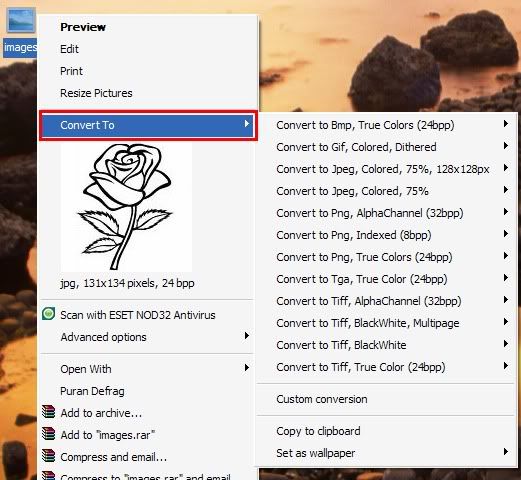
ဒီ Software ကေတာ့ ကုိယ္ေျပာင္းခ်င္တဲ့ image file type ေတြကုိ ေျပာင္းတဲ့ file type ျဖစ္ပါတယ္ ...ပုံရဲ႕ type ေတြကုိ ဘာလုိ႕ေျပာင္းသလဲ .. ဥပမာ တစ္ခုေပါ့ .. တခ်ဳိ႕ ဆုိဒ္ေတြ မွာဆုိရင္ ကုိယ္က ပုံတစ္ခုကုိ အဲဒီ့ ဆုိဒ္မွာတင္ခ်င္တယ္.. အဲဒီ့ပုံက လည္း ကုိယ့္ ရဲ႕ Desktop ကုိ screen shot ထားတဲ့ ပုံမ်ဳိးဆုိပါေတာ့... အဲဒါဆုိ ရင္ ပုံက .bmp type နဲ႕ ရပါမယ္ .. အဲဒီ့ file type မ်ဳိးကုိ တခ်ဳိ႕ ဆုိဒ္ေတြက တင္တဲ့အခါမွာ လက္ခံခ်င္မွ လက္ခံတာပါ.. အဲဒီ့အခါ က် ေတာ့ ဒီ software ကုိသုံးျပီးေတာ့ file type ကေလးကုိေျပာင္းျပီးေတာ့ တင္လုိက္ရုံပါပဲ ... file type ကုိေျပာင္းတာကေတာ့ လြယ္ပါတယ္ ... အဲဒီ့ ကုိယ္ေျပာင္းခ်င္တဲ့ ပုံကေလးကုိ r-click ေထာက္ျပီးေတာ့ ကုိယ္ၾကဳိက္တဲ့ file type ကုိ ေျပာင္းေပးႏုိင္ပါတယ္... သုံးရတာလဲ လြယ္ကူပါတယ္... အဆင္ေျပပါတယ္.. ယူခ်င္တယ္ ဆုိရင္ေတာ့ ေအာက္မွာယူႏုိင္ပါတယ္ .. အထဲမွာ serial number ကေလးပါ ပါတဲ့အတြက္ေၾကာင့္ မလုိ႕ full version အျဖစ္သုံးလုိ႕ရပါ့မယ္... ပုံေျပာင္းဖုိ႕အတြက္ အခက္အခဲ ရွိမယ္ဆုိရင္ ေအာက္မွာ ပုံကေလး ျပထားလုိက္ပါတယ္ ... Download ခ်ဖုိ႕အတြက္ကေတာ့ ေအာက္မွာ link ကေလးေတြ ရွိပါတယ္ ..ၾကဳိက္တဲ့ေနရာမွာ download ခ်ႏုိင္ပါတယ္ ...

Download link : :>>

Download link : :>>

Download link : :>>


Click ! Image to zoom!


The first step towards getting somewhere is to decide that you are not going to stay where you are ....
တစ္ေနရာရာေရာက္ဖို႕ပထမဆံုးေၿခလွမ္းကေတာ႕ သင္ေရာက္ေနတဲ႕ေနရာမွာမေနဖူးလို႕ ဆံုးၿဖတ္ခ်က္ခ်လိုက္ဖို႕ပါပဲ

Posted on Saturday, March 13, 2010 by ေမာင္လုလင္

1 comment

8.2.10


Click ! Image to zoom!

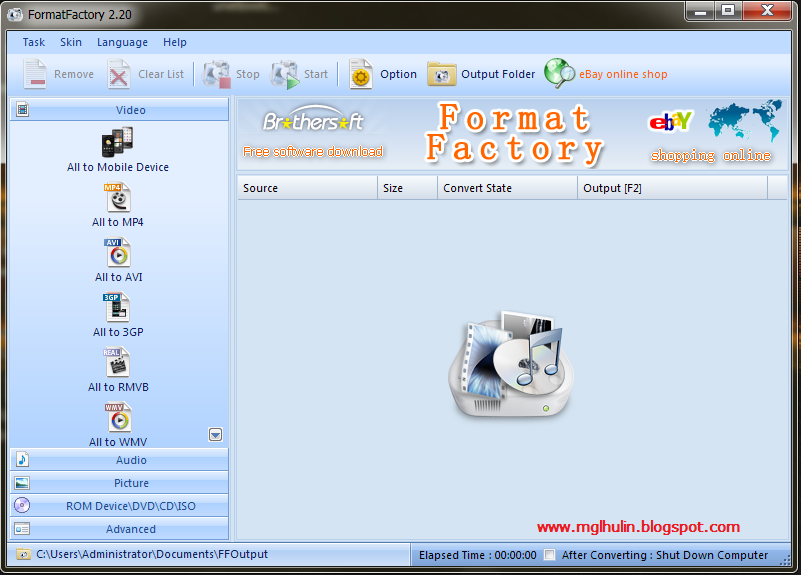
Converter ေလးပါ.။ ဒီေကာင္ က တျခား Converter ကေလးေတြ ထက္သာတာကေတာ့ သီခ်င္းေတြကုိ ကုိယ္လုိခ်င္တဲ့ အပုိင္းေလာက္ပဲ ဖ်က္ျပီးေတာ့ Convert လုပ္လုိ႕ရတာကေလးပါ ...ဥပမာ ကုိယ္က VCD သီခ်င္းတစ္ခုကုိ တျခား Mp3 ျဖစ္ျဖစ္ Wma ျဖစ္ျဖစ္ တစ္ခုခု ေျပာင္းမယ္ဆုိပါေတာ့ ...VCD ဆုိရင္ အေရွ႕ က သီခ်င္းမလာ ခင္ ဘယ္သူဘယ္၀ါ သရုပ္ေဆာင္စသျဖင့္ေပါ့ ..စာတမ္းထုိးတာကေလးေတြကုိ Mp3 လည္းေျပာင္းေရာ အဲဒီ့ ေနရာကေလးမွာ ဘာသံမွ မၾကားဘူး ကြက္လပ္ကေလး ျဖစ္ေနသလိုေပါ့.. အဲဒီ့ ေနရာကေလးေတြကုိ ဖ်က္ျပီးေတာ့ တခါတည္း သီခ်င္းေနရာကေနျပီးေတာ့ စျပီးလာေအာင္ လုပ္လုိ႕ရတာကုိ ေျပာတာပါ .. ကြ်န္ေတာ္ ေျပာမွ ပုိရႈပ္သြားသလုိပဲ :D :D ...ကုိယ့္ဘာသာကုိယ္ စမ္းျပီးေတာ့ သုံးၾကည့္လုိက္ပါ.. အဆင္ေျပသြားပါလိမ့္မယ္ .. :) ..ကြ်န္ေတာ္ တခု ေလာက္ ေမတၱာရပ္ခံပါဦးမယ္.. ကြ်န္ေတာ္ ့ Blog မွာ Download လုပ္ဖုိ႕ အတြက္ Link ကေလးေတြ ေပးထားတာကေလးေတြ ရွိပါတယ္.. တကယ္လုိ႕မ်ား အဲဒီ့ ေနရာကေလးေတြမွာ Link ကေလးေတြ မ်ား ေသေနခဲ့ရင္ Comment ျဖစ္ျဖစ္ခ်န္ထားခဲ့ေပးပါခင္ဗ်ာ.. ကြ်န္ေတာ္ ရသေလာက္ ျပန္ရွာေပးပါ့မယ္ ... တကယ္လုိ႕မ်ား ျပန္မခ်ိန္းေပးႏုိင္ခဲ့ရင္ ကြ်န္ေတာ့္ အတြက္ အဆင္မေျပ တာကေလး ေတြ ရွိလုိ႕ တခါတည္း ျပန္မတင္ေပးႏုိင္ခဲ့ရင္လည္း ခြင့္လႊတ္ေစခ်င္ပါတယ္ ခင္ဗ်ာ... ျပီးေတာ့ တစ္ေယာက္ေျပာသြားတဲ့ Photoshop -7 ကုိကြ်န္ေတာ္ ျပန္ျပီးေတာ့ Link ကုိ ေျပာင္းေပးျပီးသြားပါျပီ...Download လုပ္လုိ႕ရပါျပီခင္ဗ်ာ..အဲလုိေလး ေျပာျပေပးသြားတာကုိလည္း ေက်းဇူးတင္ပါတယ္ ..... အခု Format factory ကုိ ေတာ့ ေအာက္က ေနရာကေလးေတြမွာ ယူႏုိင္ပါတယ္ ...

Download link : :>>
Download link : :>>
Download link : :>>


Posted on Monday, February 08, 2010 by ေမာင္လုလင္

1 comment

25.8.09


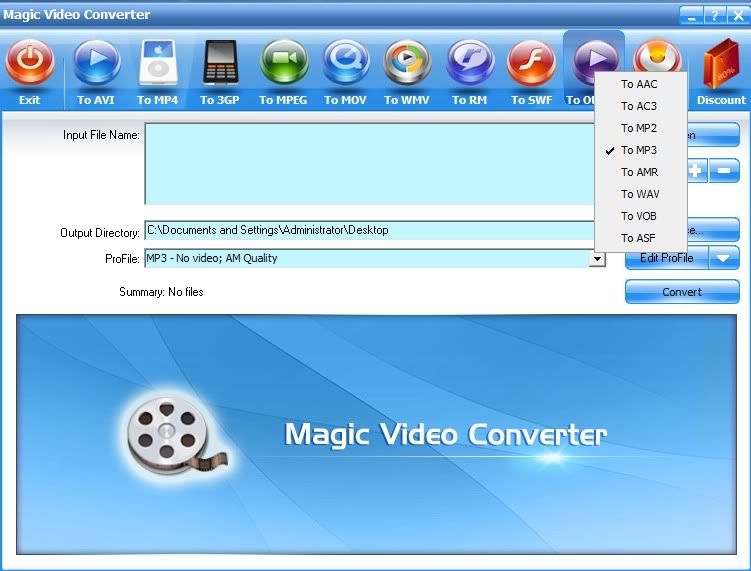
Video converter ကေလးပါ .. သူ နဲ႕ file type ေတာ္ေတာ္ မ်ားမ်ားကုိ ေျပာင္းလုိ႕ရပါတယ္ ... ကြ်န္ေတာ္ ေတာ့ အဲေကာင္ကေလးကုိပဲ သုံးပါတယ္ .. ေျပာင္းရတာလည္း လြယ္ပါတယ္ .. Portable လည္းျဖစ္ေတာ့ ေကာင္းတာေပါ့ .. သူ က ေျပာင္းလုိ႕ရရုံတင္လား ဆုိေတာ့ မဟုတ္ဘူးဗ် ... Burn လုိ႕လည္း ရတယ္ ... effect ကေလးေတြလည္းစုံပါတယ္ ... အဲ ဒါေပမယ့္ FlV ကုိေတာ့ ေျပာင္းလုိ႕မရဘူးဗ် .. အဲဒီ့ တစ္ခုေတာ့ ရွိတယ္ .. က်န္တာေတြ ေတာ္ေတာ္ မ်ားမ်ား ေျပာင္းလို႕ရတယ္ဗ်.. ယူမယ္ဆုိရင္ေတာ့ ေအာက္မွာ link ရွိတယ္ေနာ္ .. အဲဒီ့ ကေနဆြဲလုိက္ေပေတာ့ဗ်ာ ... :P


Download link : Ifile.it


Posted on Tuesday, August 25, 2009 by ေမာင္လုလင္

No comments